Stream automation for creators

Hit Replay Buffer. Post TikTok-Ready Clips in 60 Seconds.

Your Best Moments Shouldn't Die in Folders.

Turn Every Highlight Into Growth.

ClipSpark watches your OBS Replay Buffer and automatically creates viral-ready vertical videos with captions and overlays. No editing. No manual work. Just post.

Same stream workflow. Automatic highlights. TikTok-ready without editing.

25 clips free to start. Upgrade anytime for more capacity.

<60s processing time
Win/Mac App full automation now
Cross-Platform works everywhere
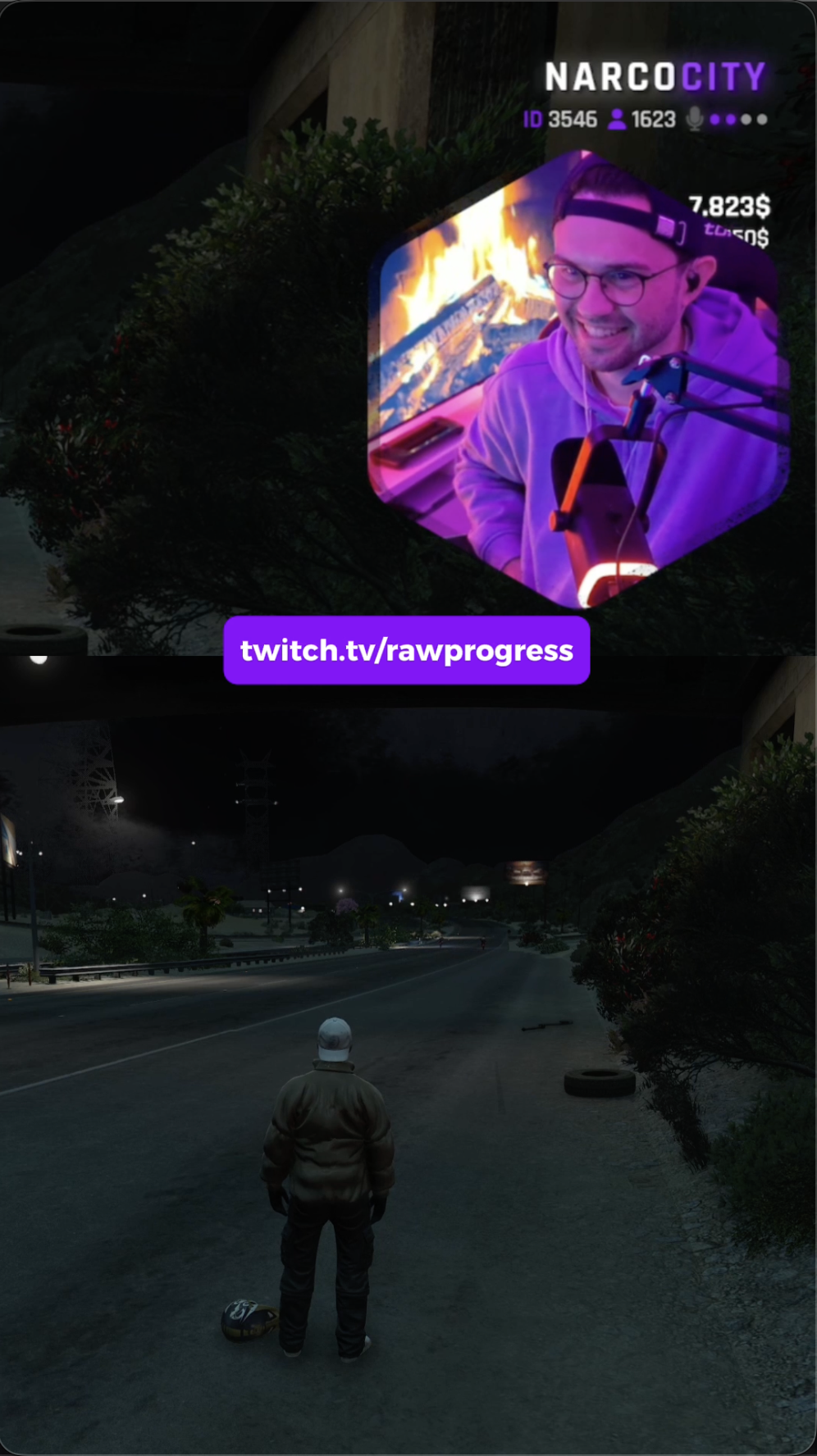
Example of ClipSpark processed vertical video with overlay and captions
The problem

Your Best Moments Are Dying in a Folder.

Every streamer has highlight gold saved — but editing kills momentum. By the time you open an editor, the moment has passed.

Editing eats hours you could be streaming.

Timelines, exports, captions — the grind that steals your live energy.

30+ unposted clips pile up every month.

The backlog grows until you forget the hype you meant to share.

Missed reach slows your growth.

Highlights that never hit social feeds never build your audience.

Yes, that “I’ll edit later” clip from last month is still there.

The solution

The Same Workflow You Love — Without the Editing Bottleneck.

ClipSpark sits next to your stream. When you hit Replay Buffer, it handles the rest.

1

Capture the moment

Hit "Stop Replay Buffer" in OBS Controls. The last 30 seconds save automatically. That's it.

OBS Controls dock showing Stop Replay Buffer button to save the last 30 seconds of gameplay
2

ClipSpark detects instantly

Configure once, then it automatically monitors your OBS Replay Buffer folder. New clip? Uploaded in seconds.

ClipSpark App settings showing API connection and automatic replay buffer monitoring
3

Auto-edit & auto-format

ClipSpark applies captions, your custom overlay, and converts to 9:16 vertical format. Processing typically completes in under 60 seconds.

ClipSpark processing interface showing clip being processed with real-time progress indicator
4

Post in seconds

Your processed clip appears in the dashboard. Download it or upload straight to TikTok drafts. Track your quota and processing queue all in one place.

ClipSpark dashboard showing processed clips, remaining quota, and production queue

Your workflow stays the same. Only the results change.

Proof

From raw to viral — in under a minute.

Same GTA V clip. One button press. Professional result.

BEFORE

Replay Buffer Output

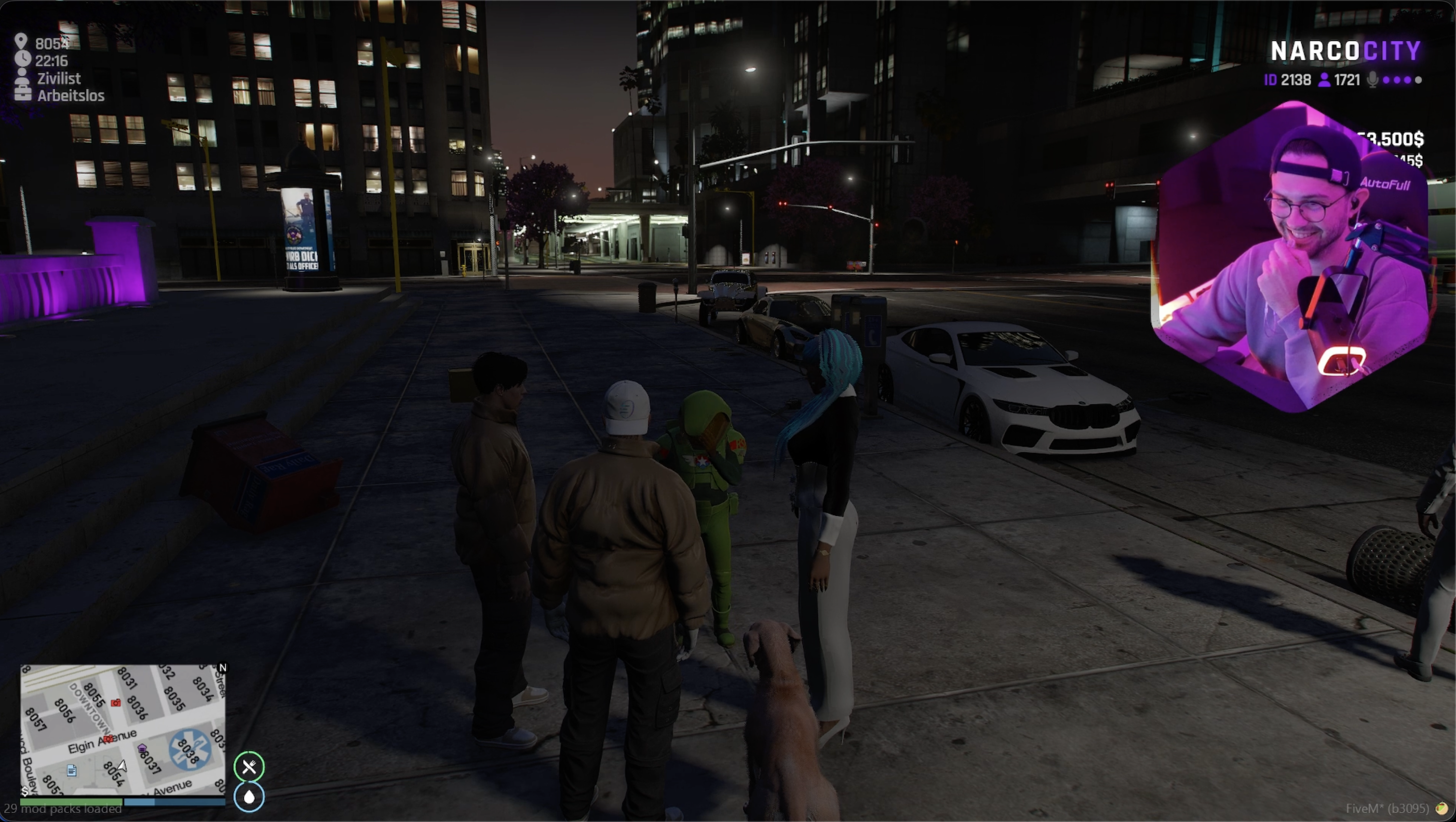
Raw 16:9 horizontal gameplay — can't post this to TikTok

Before ClipSpark: Raw horizontal OBS replay buffer clip showing GTA V gameplay
AFTER

ClipSpark Output

9:16 vertical with custom overlay, captions & Twitch branding — TikTok ready

After ClipSpark: Vertical 9:16 format with custom overlay, webcam, and Twitch username

Processing time: Under 60 seconds. Editing time: Zero.

Customization

Your brand. Your style. Zero design skills required.

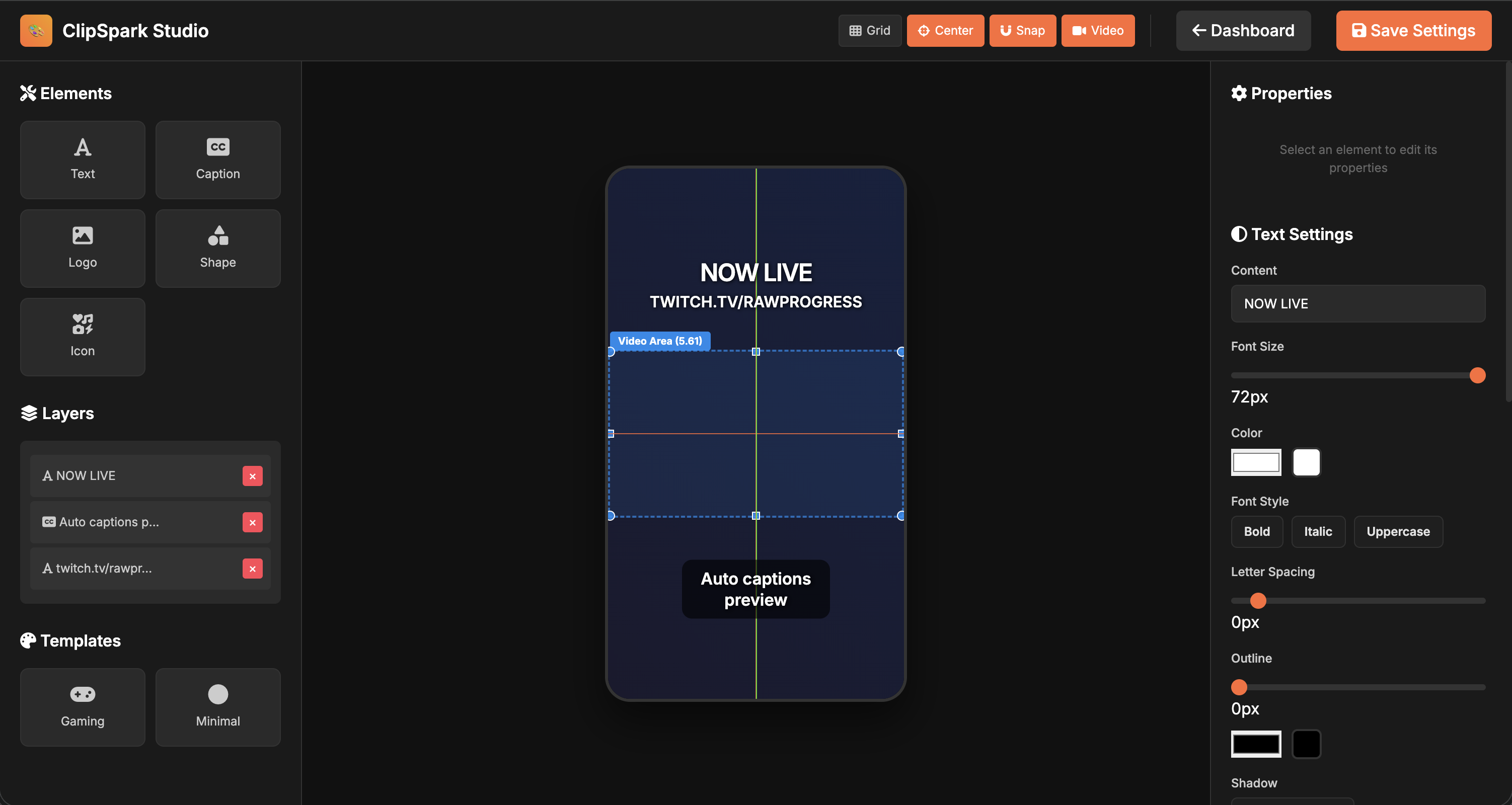
The visual overlay builder lets you drag, position, and preview every element in real-time. What you see is exactly what your clips will look like.

ClipSpark Studio overlay builder showing drag-and-drop interface with text, captions, video area, and layers
🎨
Drag & Drop Elements

Text, captions, logos, shapes, and icons. Position them exactly where you want.

👁️
Live Preview

See changes instantly. The preview shows exactly how your clips will render.

💾
Save & Reuse

Design once, apply to all clips automatically. Update anytime from the dashboard.

Benefits

Why streamers choose ClipSpark

Less editing. More streaming. More reach.

Zero Editing Stress

Forget timelines and exports. One replay click keeps your pipeline moving.

Creator Control

You choose the clip. ClipSpark handles captions, overlays, and delivery.

Professional Output

Polished captions, brand-safe overlays, and vertical formats that match top creators.

Early Access

Built for streamers who know great clips when they see them

ClipSpark is in active development. We're working with early users to perfect the workflow.

Works With Your Setup

Compatible with OBS Replay Buffer. No changes to your streaming workflow required.

Full Customization

Build your overlay in the web interface. Drag, drop, preview — matches your brand perfectly.

Your Data, Your Control

Download or delete clips anytime. We process your content, you own the results.

Want to be featured here? Try ClipSpark and send us your best processed clip. Real results from real streamers will be showcased on this page.

Join Early Access
Pricing

Simple, fair pricing.

Start free. Upgrade when you want full automation.

Free

€0/month
  • 25 clips per month
  • AI processing & subtitles
  • Custom overlay builder
  • OBS integration
  • ClipSpark watermark
Get Started
⭐ MOST POPULAR

Starter

€7.99/month
  • 50 clips per month
  • ✅ NO watermarks
  • AI processing & subtitles
  • Custom overlay builder
  • OBS integration
  • Email support
Start Now

Just €0.16 per clip

Pro

€14.99/month
  • 150 clips per month
  • ✅ NO watermarks
  • AI processing & subtitles
  • Advanced overlay builder
  • OBS integration
  • Priority processing
Upgrade

Just €0.10 per clip

Unlimited

€24.99/month
  • Unlimited clips
  • ✅ NO watermarks
  • AI processing & subtitles
  • Advanced overlay builder
  • OBS integration
  • Priority processing
Go Pro

Never worry about limits

Cancel Anytime

No contracts. No commitments. Stop whenever you want.

You Own Your Clips

Download, delete, or repost. Full control of your content.

25 Free Clips

Try before you buy. No card required to start.

Secure payments via Stripe
SSL encrypted checkout
GDPR compliant

Full automation requires Windows. Mac & Linux creators can upload via the web app today — full automation coming soon.

FAQ

Answers, no fluff.

How is this different from Medal or Outplayed?

ClipSpark integrates directly with your existing OBS Replay Buffer workflow. Medal and Outplayed require separate recording software. We focus on streamers who already know when great moments happen.

Can I customize the captions and overlays?

Yes. The overlay builder lets you position elements exactly where you want. Drag, drop, preview in real-time. Every clip uses your custom design automatically.

Will ClipSpark slow down my stream?

No. Processing happens after OBS finishes saving the file. Zero impact on your stream performance or gameplay.

Do I keep control of my clips?

Always. You own every file. Download, delete, and repost whenever you want. We process your content, you control the results.

What platforms are supported?

ClipSpark App is available for Windows 10/11 and macOS (Apple Silicon). Both include automatic OBS replay buffer monitoring and instant upload. Linux support coming soon.

Is the free plan really free?

Yes. Twenty-five clips per month, full quality, no card required. Test the entire workflow before upgrading. Upgrade only when you're ready for more capacity.

What are the system requirements?

Windows 10/11 (64-bit) or macOS with Apple Silicon (M1/M2/M3). OBS Studio 28.0+ with Replay Buffer enabled. Stable internet connection for uploads. Works with any OBS-compatible game or application.

Is there a video length limit?

Yes. Maximum clip length is 30 seconds. This is optimized for TikTok and short-form content where viewer retention is highest in the first 30 seconds.

Ready to start?

Turn Your Replay Buffer Into Growth

Start with 5 free clips. No credit card. No commitment. Just results.